A guided start.
Enter starting cash, pay dates, recurring income, and expenses in a guided screen. Organize categories into groups and apply your setup to the plan.
 BalanceRadar2.0
Introducing Balance Radar 2.0
You don’t need another subscription.
An app-like experience in Excel. Bring your paychecks, bills, and everyday spending into one clear plan—and see what’s coming before the next payday.
For Microsoft 365 desktop Excel on Windows.
Excel license required separately.
Your plan, actual spending, and the days ahead.
Meet Balance Radar 2.0
See how payday, bills, and actual spending come together in a clearer cash-flow plan. A 36-second introduction with narration, music, and captions.
Your bank balance says twelve hundred fifty dollars.
Your bills say... we should talk.
Meet Balance Radar.
See what's coming before payday gets here.
Set your view around how you get paid.
Add your bills. Enter your spending.
Your plan and actuals, together.
Get a play-by-play of your expected cash flow in Active Period Detail.
All with an app-like experience in Excel.
Fourteen ninety-nine, once. No Balance Radar subscription.
See it coming. Get control. Balance Radar dot com.
Follow guided Setup, Ledger, Planning, Active Period Detail, and Dashboard. On-screen text follows the workflow; music is optional.
Features
Start with what you expect. Add what actually happens. Adjust your plan as the month unfolds.
Enter starting cash, pay dates, recurring income, and expenses in a guided screen. Organize categories into groups and apply your setup to the plan.
Choose Weekly, Biweekly, Semi-Monthly, or Monthly. Review upcoming periods and adjust an eligible period’s forecast directly in the cell.
Enter transactions or paste a prepared bank export, then assign categories. Actual checking-account activity stays accounted for in your plan.
See expected forward-looking cash flow in Active Period Detail. Review open events, refine eligible dates, and follow running projected cash.
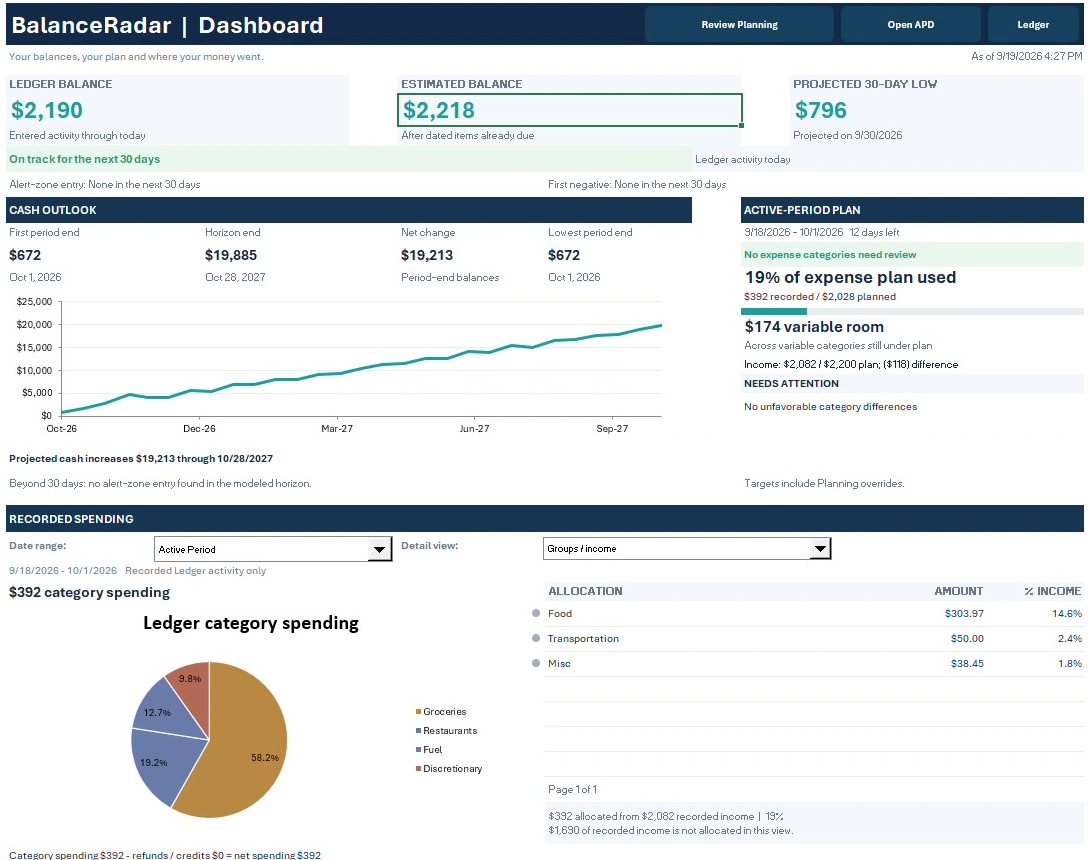
Review your cash outlook and spending allocation together. Use the graphs to spot the next question, then return to Planning or APD for the details.
Run Hidden Danger to check for intra-period dips that an ending balance can hide. Use Sandbox / What-If to explore an idea before changing your plan.
Compatibility
Balance Radar is a macro-enabled Excel workbook for one primary checking account. The supported setup is Microsoft 365 desktop Excel on Windows.
Use the desktop application. Microsoft Excel is not included and requires a separate license.
VBA powers the controls and workflows. Download and extract the files, keep the workbook in .xlsm format, and follow the included first-open instructions.
Includes the workbook, a user guide in PDF and Word, and Start Here instructions. No physical item is shipped.
Excel for the web, mobile Excel, Excel for Mac, Google Sheets, LibreOffice, and older perpetual Excel editions.
One clear place to start
Your income, your spending,
and a clearer view of what’s next.
Guided Setup · Planning · Ledger · APD · Dashboard · Hidden Danger · Sandbox
The macro-enabled workbook, updated user guide, and first-open instructions.
One-time purchase. No Balance Radar subscription.
Get Balance Radar 2.0Continue to Gumroad for purchase details and checkout.
Requires Microsoft 365 desktop Excel for Windows with macros enabled. Excel is sold separately.
A few helpful details
No. Enter transactions yourself or paste a prepared Date, Description, and Amount export into Ledger, then assign categories. Reconcile the entered cash position against your bank records.
Planning shows the rolling forecast and lets you change eligible period totals. Active Period Detail focuses on the current period’s expected events, dates, and running projected cash.
No. Planning view controls how time is grouped. Each item’s recurrence remains separate. Changing the period structure can clear period-specific overrides, so choose your preferred view before detailed adjustments.
Yes. Balance Radar calculates from your inputs. Keep Ledger and expected amounts and dates current so the outlook reflects your situation.
No. Keep your existing workbook and backups. The 2.0 sales workbook starts with a blank plan and is not an automatic data-migration tool.
No. It is a projection based on the information you enter. Changes in income, spending, or timing change the result. Verify actual balances against your bank records.